Free · no sign-up · runs in your browser
A ready-made case sheet, without the PDF ever leaving your computer.
S.A.P.O. reads Brazilian court filings right in the browser: it identifies the type of each page, the parties, the operative part of the ruling and the deadlines with their due dates in business days, flags personal data and builds a PDF report.
- No file is uploaded
- Works offline after the first visit
- Open source, MIT license
The problem
Long case files, a running clock and sensitive data on every page
Long filings
Finding the operative part, the parties and the amount in dispute in a PDF dozens of pages long eats the time that should go to the case.
Deadlines in business days
Counting a due date by hand, skipping weekends, holidays and the court recess, is exactly where mistakes creep in.
Personal data
Case files carry taxpayer IDs, addresses and phone numbers. Uploading that PDF to an online service exposes data protected by the LGPD, Brazil’s data protection law.
What it does
Everything the filing says, laid out in one place
Drop in a PDF (digital or scanned) or paste the text. S.A.P.O. gives you:
Case sheet
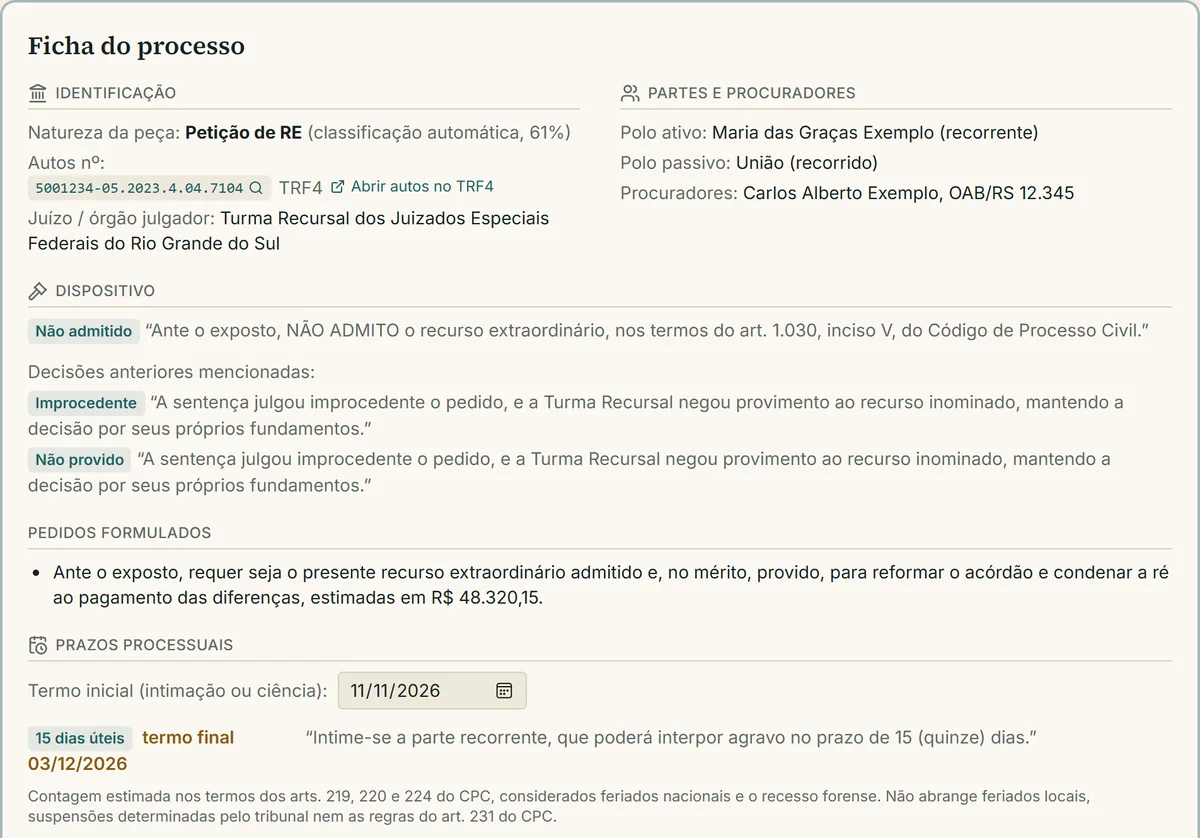
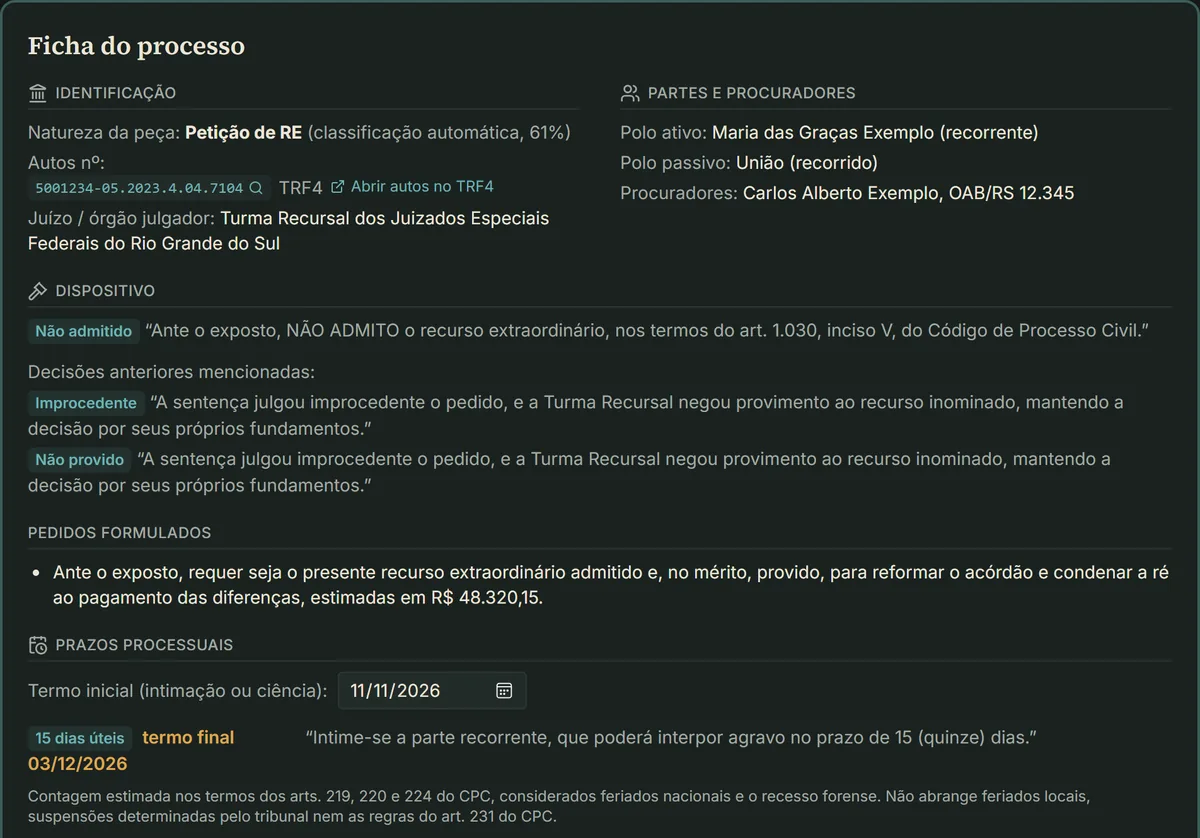
Type of filing, case number and court from the CNJ number, outcome of the decision, parties by side, lawyers with their bar (OAB) numbers, labeled amounts and a timeline.
Deadlines with due dates
Finds deadlines in the text and computes the due date from the date of service, in business days (Brazilian Code of Civil Procedure, arts. 219, 220 and 224), with national holidays and the court recess.
Batch triage
Up to 30 PDFs at once, in a table with type of filing, operative part, case number and deadlines.
PDF report
A case analysis report generated in the browser: identification, parties, operative part, claims, deadlines, amounts, legal grounds, chronology and summary.
Type of each page
Appellate judgment (acórdão), appeal against denial of an Extraordinary Appeal (agravo em RE), admissibility order (despacho), Extraordinary Appeal petition, trial judgment (sentença) or other. Consecutive pages of the same type are grouped into one document.
Personal data and LGPD
CPF and CNPJ (Brazilian taxpayer IDs) checked by their check digits, email, phone, address, ID card, driver’s license and PIS. An exposure score from 0 to 100 and an anonymized text to download.
Legal references
CNJ case numbers, statutes, articles, binding precedents (súmulas), courts, dates and amounts cited in the filing.
Extractive summary
The most central sentences of the text, weighted toward the operative part and the claims.
OCR for scanned PDFs
Portuguese text recognition with tesseract.js, served by the site itself, with no CDN.
Case progress on Datajud
Case class, subjects, court division and every docket entry, with key milestones highlighted, time in court and an alert when a case has been idle for more than 90 days.
Shortcut to the case files
Detects the court’s e-filing system (PJe, eproc, e-SAJ…), copies the number and opens the right public search. You download the PDF and drop it into the analyzer.
Works offline
After the first visit, the site opens and analyzes documents with no internet connection. Only the Datajud lookup needs to be online.
Privacy
The PDF never leaves your device
There is no server that receives the document. Data protection comes from how the product works, not from a promise in the terms of use.
In your browser
- PDF reading and OCR
- Classification of each page
- Parties, deadlines, amounts and references
- Detection and anonymization of personal data
- Summary and PDF report
On the server
- Only the CNJ case number, and only when you ask for a Datajud lookup
- The route validates the check digit and queries the CNJ public API
How it works
Three steps, no sign-up
- 1
Open the analyzer
Right in your browser, with nothing to install and no account to create.
- 2
Drop in PDFs or paste the text
Up to 30 files at once, digital or scanned. Everything is processed on your device.
- 3
Read the case sheet, download the report
Type of filing, parties, operative part, deadlines with due dates, personal data and anonymized text, plus a PDF report.
Model and results
Trained on real Brazilian Supreme Court pages
Logistic regression over TF-IDF (unigrams and bigrams, 30,000 terms), trained on 149,000 pages from VICTOR, a dataset of Extraordinary Appeals filed with Brazil’s Supreme Federal Court (STF) and labeled by the court’s own experts (UnB/STF, LREC 2020). The model weighs 1.4 MB and runs in TypeScript in the browser, with no ML library.
Why the site treats every class as equally likely
In the test set, 89% of pages are “Other” (certificates, powers of attorney), because each case comes in whole. On the site you send one filing at a time, so inference assumes equally likely classes: mean per-class recall rises from 74.2 to 86.8, and macro F1 in that setting is 57.6. Fewer important documents slip through, at the cost of more false positives.
| Model | Macro F1 | Weighted F1 |
|---|---|---|
| S.A.P.O. (TF-IDF + logistic regression) | 78.2 | 94.7 |
| Linear SVM (original paper) | 76.3 | 94.3 |
| CNN (original paper) | 75.8 | 94.7 |
F1 by class
- Appellate judgment88.4
- Trial judgment81.1
- Extraordinary Appeal petition74.6
- Admissibility order71.2
- Agravo em RE56.8
- Other97.4
Limitations
What S.A.P.O. does not do
- “Agravo em RE” (appeal against denial of an Extraordinary Appeal) is the hardest class (F1 of 56.8): it gets confused with the Extraordinary Appeal petition, as in the original paper.
- The model knows the typical documents of an Extraordinary Appeal. Contracts, legal opinions and documents from other areas are not among its classes.
- The deadline calculation leaves out state and municipal holidays and the special service rules of art. 231 of the Code of Civil Procedure.
- Parties, outcome, amounts and deadlines come from rules applied to the text: useful for triage, but they need to be checked.
- Datajud takes 30 to 50 seconds per lookup, is rate-limited and does not cover the Supreme Federal Court (STF).
- It reads Brazilian documents in Portuguese only. It is not legal advice, and the personal-data check does not replace an LGPD compliance assessment.
FAQ
Before you start
Is S.A.P.O. free? Do I need an account?
It is free and needs no sign-up or login. The code is open source under the MIT license and available on GitHub.
Is my PDF sent to a server?
No. Reading, OCR, classification, data extraction and anonymization all happen in your browser. The only exception is the Datajud lookup, which sends just the case number.
Does it work with documents from other countries or in English?
No. S.A.P.O. is built for Brazilian court documents in Portuguese: the model was trained on Brazilian Supreme Court pages, and deadlines follow the Brazilian Code of Civil Procedure.
How are deadlines calculated?
S.A.P.O. finds the deadline in the text (for example, “no prazo de 15 (quinze) dias”) and counts from the date of service you enter, in business days, under arts. 219, 220 and 224 of the Brazilian Code of Civil Procedure, with national holidays and the court recess. Local holidays and art. 231 are not included, so double-check the result.
Which types of filing does it recognize?
Appellate judgment (acórdão), Agravo em RE, admissibility order (despacho), Extraordinary Appeal petition, trial judgment (sentença) and other: the classes of the STF’s VICTOR dataset.
Why is the Datajud lookup slow?
The CNJ public API takes 30 to 50 seconds per lookup and is rate-limited. If it fails, the page explains why and shows how to open the case files at the court so you can analyze the PDF.
Does it work without internet?
Yes, after your first visit to the analyzer: a service worker stores the page, the model and the OCR engine. Only the Datajud lookup needs a connection.
Does it replace a lawyer’s review?
No. It is a triage tool: results come from rules and a statistical model and must be checked. It is not legal advice.

Ready to read your next case?
Open the analyzer and drop in a PDF. It is free, needs no sign-up and the document never leaves your browser.